


Written by
Founder & CEO, Gspikes
I own and run Gspikes, the agency I founded in 2018. Before going all-in, I led SEO at Chain Reaction — one of the region's largest digital agencies — and shipped production code at Orange and Forbes. Everything published here comes from projects I've personally built, migrated, or ranked.
Last updated · October 2026
Roughly 30% of the Drupal web still runs Drupal 7 — nineteen months past end of life. Most of those site owners aren’t ignoring the problem; they’re stuck at the same question: where do you even start?
This is the checklist we run on every Drupal 7 → 10/11 migration. Fifty-two steps, seven phases, in the order we actually do them. Every step on this list earned its place by being skipped on some site we were later called to rescue. It’s long because migrations fail in the details — but each step is one decision, and none of them is mysterious.
Two notes before the list. First, this checklist is platform-agnostic about your destination version: if you’re still choosing between Drupal 10 and 11, that decision has its own guide — for most sites migrating in 2026, go straight to 11. Second, the summary card below is free to print, share, and reuse with attribution.
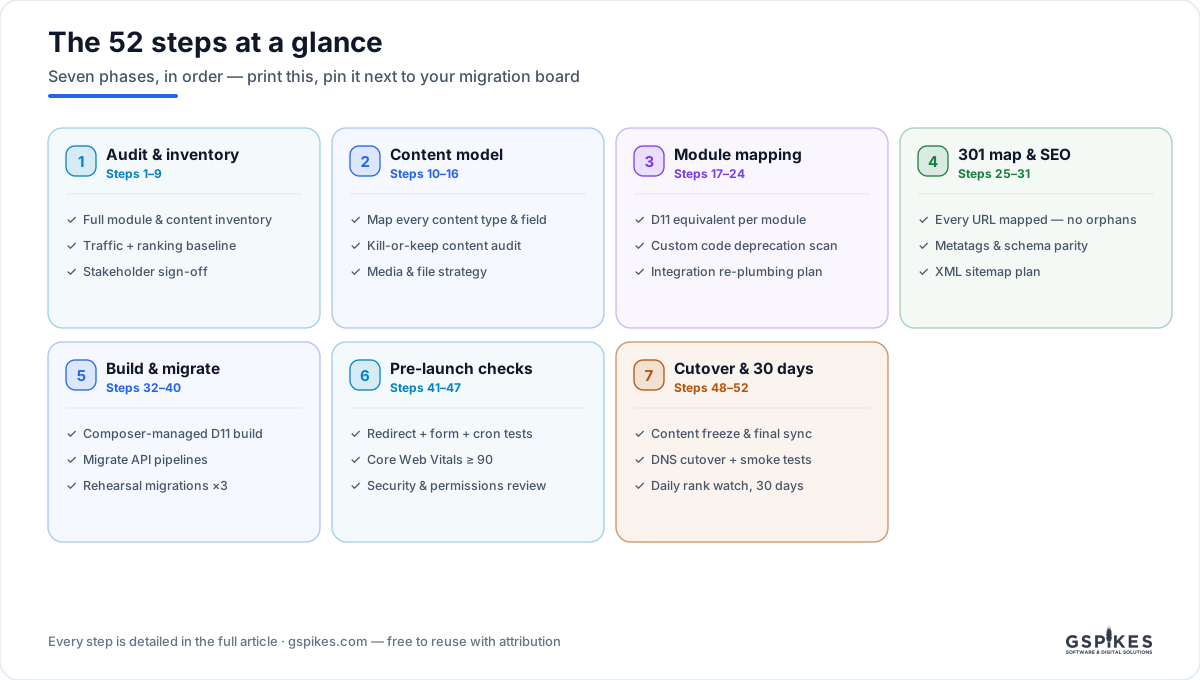
Phase 1 — Audit & inventory (steps 1–9)
The audit phase has one goal: no surprises after the quote is signed. Every migration horror story starts with something nobody inventoried.
- Inventory every module — enabled, disabled, and the ones nobody remembers installing. Note which are actually used; a shocking share won’t be.
- Inventory the content — every content type with node counts and last-edited dates. A type nobody has touched since 2019 is a migration candidate for the trash, not the pipeline.
- Freeze a traffic and ranking baseline — export Analytics and Search Console data now. This is the evidence you’ll defend during cutover; you can’t reconstruct it later.
- Map every integration — CRM syncs, SSO, payment gateways, feeds, and the cron jobs quietly holding it all together.
- Find the custom code — custom modules, template overrides, and the hardcoded database queries someone left in a theme in 2014.
- Interview the editors — the workflows the site must keep are in their heads, not the codebase.
- Check database health — table sizes, orphaned records, revision bloat. Cleaning cruft before migration cuts rehearsal times dramatically.
- Pick the destination version — Drupal 11 for almost everyone now; document the reasoning either way.
- Get written scope sign-off — what migrates, what dies, what gets rebuilt. Before any code.
Phase 2 — Content model (steps 10–16)
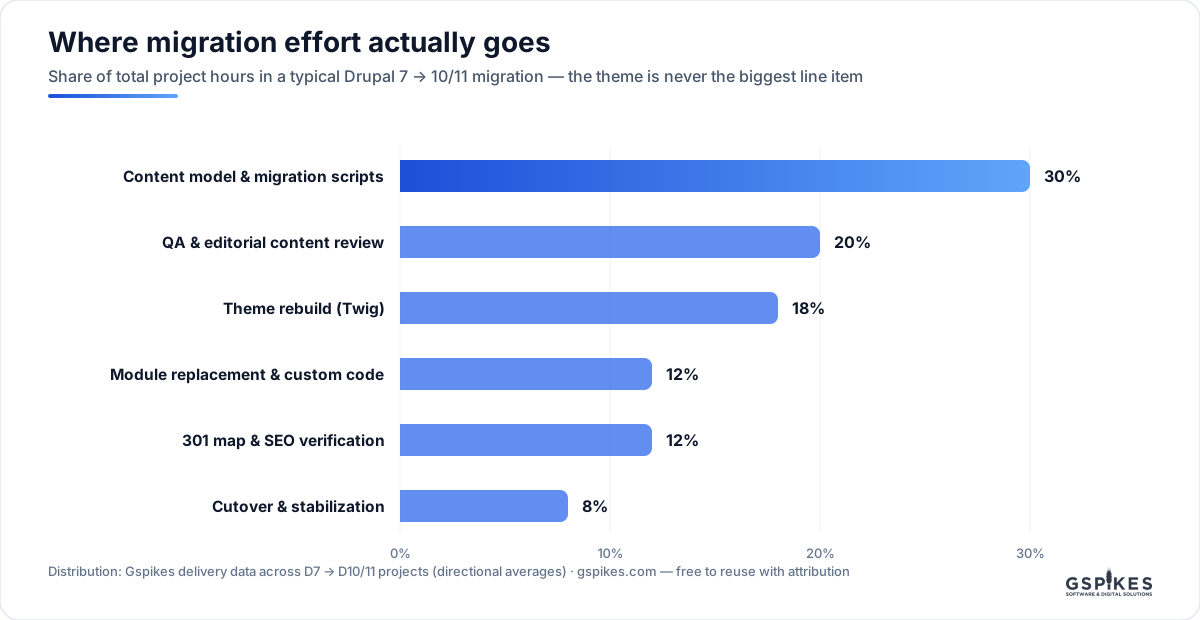
This is the phase people underestimate. It’s the single biggest line item in a migration budget — bigger than the theme:
- Map every content type to its new bundle — field by field, with types, cardinality, and required flags. This document is the migration’s constitution.
- Run the kill-or-keep content audit — expect 30–40% of content not to move. Migrating garbage costs the same as migrating gold.
- Document field-type conversions — especially text formats and anything stored as serialized data. This is where silent data loss lives.
- Plan the media migration — D7 file fields become Media entities; decide the mapping once, centrally, not per content type.
- Rationalize taxonomy — merge the four nearly-identical vocabularies now, not after they’re migrated.
- Decide URL alias and language architecture — alias patterns, multilingual entity setup, and what happens to legacy language prefixes.
- Design the editorial workflow — content moderation states in core replace whatever Workbench arrangement D7 had.
Phase 3 — Module mapping (steps 17–24)
- Give every kept module a verdict — moved into core / D11 contrib equivalent / custom port / dropped. A written decision per module, not a hope.
- List every View for rebuild — Views don’t migrate; they get rebuilt. Knowing how many exist is the difference between an estimate and a guess.
- Scan custom code for deprecations — run the static analysis tooling against everything you’re porting.
- Diff contrib modules against their originals — the patches someone applied in 2016 and never documented will otherwise vanish silently.
- Re-plumb integrations properly — queue-backed, monitored, using current APIs. Never port a brittle point-to-point script as-is.
- Plan search — core Search or Search API + a backend, decided by content volume and facet needs.
- Plan the cache architecture — Dynamic Page Cache, BigPipe, cache tags, and the CDN in front. Performance is designed here, not tuned later.
- Rebuild the permission model deliberately — D7 role sprawl is a security audit finding waiting to happen; don’t recreate it.
Phase 4 — The 301 map & SEO baseline (steps 25–31)
Half of ranking survival is redirect discipline. This phase is why our migration projects keep their traffic through cutover.
- Crawl the old site completely — every URL, not just node aliases: files, feeds, views pages, query-string variants that earned links.
- Build the 301 map — every legacy URL to its new home, exactly one hop, no chains. Nothing is allowed to 404.
- Preserve alias patterns where possible — a URL that doesn’t change is a redirect you don’t need.
- Audit metatag parity — titles and descriptions that rank today must survive verbatim.
- Audit structured-data parity — whatever schema the old site emitted, the new one must match or improve.
- Plan XML sitemaps and 404 handling — sitemap submitted at launch, Search 404 catching what slips through.
- Freeze the ranking snapshot — the exact positions you’re defending, dated, in a spreadsheet. Post-launch arguments are settled by this document.
Phase 5 — Build & migrate (steps 32–40)
- Build the destination site Composer-managed — configuration in git, environments reproducible from the repository.
- Write migration pipelines per content type — the Migrate API upgrade path plus custom source plugins where the content model changed.
- Run rehearsal migration #1 — full run, every warning logged. It will be ugly; that’s what rehearsals are for.
- Diff the content — automated counts per bundle plus human spot checks. “It ran without errors” is not the same as “everything arrived.”
- Rebuild the theme in Twig — and make the design-debt decision consciously: pixel-parity port or refresh, never an accidental mix.
- Run rehearsal #2 and time it — the runtime defines your cutover window.
- Put editors on the rehearsal copy — real people doing real tasks find what automated QA can’t.
- Load and spot-test the 301 map — the Redirect module carries the map from step 26; verify a sample end-to-end.
- Run rehearsal #3 — a clean run with zero manual fixes. That’s the definition of ready; anything less means another rehearsal.
Phase 6 — Pre-launch verification (steps 41–47)
- Test every legacy URL by script — the full crawl list from step 25, each expecting a 301 landing on a 200. Not a sample — all of them.
- Test forms and email end-to-end — submissions arrive, notifications send, spam protection works.
- Verify cron, queues, and scheduled jobs — the invisible machinery that breaks loudest.
- Hit Core Web Vitals targets on key templates — 90+ before launch, on the hosting the site will actually run on, not a developer laptop.
- Run the security review — roles, permissions, stale admin accounts, HTTPS and headers.
- Verify analytics and conversion tags on staging — and put “remove noindex” on the launch checklist in writing. Yes, it happens.
- Write and rehearse the rollback plan — lower DNS TTLs now. A rollback you’ve rehearsed is a non-event; one you haven’t is a crisis.
Phase 7 — Cutover & the first 30 days (steps 48–52)
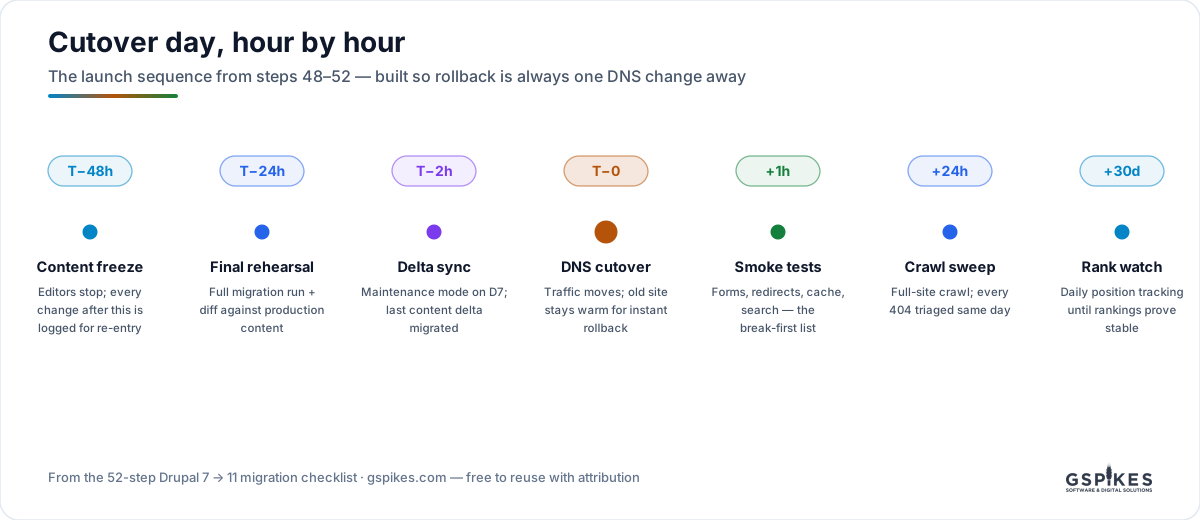
- Freeze content at T−48h — editors stop; every change after the freeze is logged for re-entry. The final rehearsal runs against frozen content.
- Sync the delta at T−2h — maintenance mode on the old site, last content delta migrated, final counts verified.
- Cut DNS at T−0 — traffic moves; the old site stays warm and untouched so rollback is a single DNS change.
- Smoke-test immediately, crawl within 24h — forms, redirects, cache behavior, search first; then a full-site crawl with every 404 triaged the same day.
- Watch rankings daily for 30 days — positions wobble for a week or two, then settle. Only when the snapshot from step 31 matches reality do you call the migration done.
Use it, steal it, argue with it
All three graphics and the checklist itself are free to reuse with attribution and a link. If your migration has a step we’re missing — or you think one of these is overkill — we genuinely want to hear it; this list gets revised the same way it was built: by what breaks in the field.
Gspikes is a Drupal development and SEO agency; Drupal 7 migrations without ranking losses are our flagship service. This checklist is the reason we can put “rankings preserved” in writing.
Field Notes
Get the next one by email
Research on Drupal, WordPress and search. Measured, not guessed. New pieces straight to your inbox.
Put senior Drupal engineers on it
Migrations, custom modules, integrations, and support with real SLAs — with a fixed-price quote from a senior engineer within 3 days.